Thursday, 19 November 2015

How To Install LAMP on Ubuntu 12.04

Linux         Apache         MySQL             PHP

Step One—Install Apache

open terminal and type in these commands:

sudo apt-get update
sudo apt-get install apache2

Step Two—Install MySQL

sudo apt-get install mysql-server libapache2-mod-auth-mysql php5-mysql
 
Once you have installed MySQL, 
we should activate it with this command:
sudo mysql_install_db
 
Finish up by running the MySQL set up script:
sudo /usr/bin/mysql_secure_installation
 
Remove anonymous users? [Y/n] y                                            
 ... Success!
Disallow root login remotely? [Y/n] y
... Success!
Remove test database and access to it? [Y/n] y
 - Dropping test database...
 ... Success!
 - Removing privileges on test database...
 ... Success!
Reload privilege tables now? [Y/n] y
 ... Success! 

Step Three—Install PHP

sudo apt-get install php5 libapache2-mod-php5 php5-mcrypt

It may also be useful to add php to the directory index,
 to serve the relevant php index files:


sudo nano /etc/apache2/mods-enabled/dir.conf

Add index.php to the beginning of index files. The page should now look like this:

<IfModule mod_dir.c>
 DirectoryIndex index.php index.html index.cgi index.pl index.php index.xhtml index.htm
</IfModule>

Step Four—RESULTS: See PHP on your Server

Apache document root is "/var/www" So give full permission.
sudo chmod -R 777 /var/www
  
To set this up, first create a Test Page:
sudo nano /var/www/info.php
 
Add in the following line:
<?php
 phpinfo();
?>

Restart apache so that all of the changes take effect:
sudo service apache2 restart

Step Five

http://localhost/info.php


Thursday, 27 March 2014

How to search on Google


Tip 1: Keep it simple

No matter what you're looking for, try to start with a simple search like [where's the closest airport?]. You can always add a few descriptive words if necessary.
If you're looking for a place or product in a specific location, add the location. For example, [bakery seattle].

Tip 2: Search using your voice

Tired of typing? Click the  microphone icon in Chrome's search box to search by voice.

Tip 3: Use web friendly words

Use words that are most likely to appear on websites. For example, instead of saying [my head hurts], say [headache], because that’s the word a medical site would use.

Tip 4: Don’t worry about the little things

  • Spelling. Google's spell checker automatically uses the most common spelling of a given word, whether or not you spell it correctly. 
  • Capitalization. A search for [New York Times] is the same as a search for [new york times].
  • Punctuation. Most punctuation, like ?!,.%^*()[]\, is ignored when you search.

Tip 5: Find quick answers

For many searches, Google will do the work for you and show an answer to your question on the search results. Some features, like information about sports teams, aren't available in all regions.
  • Weather. Search [weather] to see the weather in your location or add a city name after weather to find weather for a certain place.
  • Dictionary. Put [define] in front of any word to see its definition. 
  • Calculations. Enter a math equation like [3*9123], or solve complex graphing equations.
  • Unit conversions. Enter any conversion, like [3 dollars in euros].
  • Sports. Search for the name of your team to see a schedule, game scores and more. 
  • Quick facts. Search for the name of a celebrity, location, movie, or song to find important information. 

Become a search expert Click Here 


Wednesday, 5 February 2014

Repair, Restore, or Reinstall Grub with a Ubuntu Live CD

Reinstall Grub 2 with a Ubuntu Live CD

 1. Boot from Ubuntu Live CD

2. Open Terminal and type the following

3.  $sudo su -

4. #fdisk -l (Note the Linux boot Partition Num - EXT4)

5  #mount /dev/sdXY /mnt (Change XY to your partition Number

6. #mount --bind /dev /mnt/dev && sudo mount --bind /dev/pts /mnt/dev/pts && sudo mount --bind /proc /mnt/proc && sudo mount --bind /sys /mnt/sys

7. #chroot /mnt

8. #grub-install /dev/sdX

9. #grub-install --recheck /dev/sdX

10. #update-grub


Relax....!!!! 

Thursday, 14 March 2013

Restore the Windows 7 MBR

1. Boot your computer to the Windows 7 DVD (or to a "Repair CD"). At this screen choose to install now.


Repair and select "Command Prompt".


The command we will use, bootsect.exe, is in a folder (named boot) on the DVD.

Use your DVD drive letter and

To restore the "bootsector code":


TYPE: bootsect /nt60 SYS /mbr
and press Enter

Completed successfully,


More information : http://www.sevenforums.com/tutorials/20864-mbr-restore-windows-7-master-boot-record.html
 

Friday, 20 April 2012

sqlplus Error : Oracle 11g

Error : sqlplus: error while loading shared libraries: /opt/app/oracle/product/11.2.0/dbhome_1/lib/libclntsh.so.11.1 

What could be the problem and how to resolve it. 

Reason : The SELinux is running in "Enforcing" mode on Linux Server. So the required permission should be assign for sqlplus.


Solution : Change SELinux from the default “Enforcing” mode to the “disabled” mode.

Wednesday, 1 February 2012

move tablespace datafile between filesystems

Move datafile to another filesystem on a separate mount point

Offline the tablespace
SQL>ALTER TABLESPACE DOMAIN OFFLINE;

Move datafile to new location
$mv /u01/domain01.dbf /opt/

Rename datafile
SQL>ALTER TABLESPACE DOMAIN RENAME DATAFILE '/u01/domain01.dbf' TO '/opt/domain01.dbf';

Online the tablespace again
SQL>ALTER TABLESPACE DOMAIN ONLINE;


For Temporary tablespace
SQL>ALTER DATABASE TEMPFILE '/u01/tempdom1.dbf' OFFLINE;

Drop the existing tablespace
SQL>DROP TABLESPACE TEMPDOMAIN INCLUDING CONTENTS;

Create new Temporary tablespace
SQL>CREATE TEMPORARY TABLESPACE TEMPDOMAIN
TEMPFILE '/opt/tempdom1.dbf' SIZE 200 M AUTOEXTEND ON EXTENT MANAGEMENT LOCAL;

Thursday, 5 January 2012

Restore Archivelogs to new location using RMAN

The solution is used to copy archivelogs from RMAN catalog.

Step 1: uncatalog the required archivelogs from RMAN prompt

RMAN>CHANGE ARCHIVELOG FROM LOGSEQ=60 UNTIL LOGSEQ=70 UNCATALOG;

Once the archivelogs have been successfully uncataloged, you are now able to successfully restore the archive logs to a new location.

RMAN>run{
set archivelog destination to '/tmp/arch';
restore archivelog from logseq=60 until logseq=70;
}

Cataloging archivelogs again by added them to the RMAN repository

RMAN>CATALOG ARCHIVELOG '/opt/log/1_60_archivelog.log';

Cataloging multiple copies in a directory

RMAN>CATALOG START WITH '/opt/log';

Thursday, 3 November 2011

Redo Log Recovery

Recover Redo01.dbf
============================
SQL>SHUTDOWN IMMEDIATE;

SQL>STARTUP MOUNT;

SQL>SELECT GROUP#, ARCHIVED,STATUS FROM V$LOG;
1 NO CURRENT
2 YES INACTIVE
3 YES INACTIVE

SQL>ALTER DATABASE CLEAR UNARCHIVED LOGFILE GROUP 1;

DROP logfile Group
====================
SQL>ALTER DATABASE DROP LOGFILE GROUP 1;
(Remove redo01.log manualy)

Create Logfile Group
====================

SQL>ALTER DATABASE ADD LOGFILE GROUP 1 ('/opt/app/oracle/oradata/scdcc/redo01.log') size 50000K;

SQL>ALTER DATABASE OPEN;

Wednesday, 6 July 2011

Oracle Index

Oracle Index
An index is an optional structure associated with a table to have direct access to rows, which can be created to increase the performance of data retrieval. Index can be created on one or more columns of a table.

Indexes are automatically maintained and used by Oracle.


SQL>create index test on company (cname);

Index created.

SQL>drop index test;

Index dropped.

Altering Oracle Index
SQL>ALTER INDEX ix_emp_01 REBUILD ;

Synonym

A synonym is an alternative name for objects such as tables, views, sequences, stored procedures, and other database objects.

SQL>create public synonym suppliers for app.suppliers;

Now, users of other schemas can reference the table called suppliers without having to prefix the table name with the schema named app..

SQL>select * from suppliers;


Drop public synonym suppliers;

SQL>drop public synonym suppliers;
This drop statement would drop the synonym called suppliers that we defined earlier.


Create View

A view is a virtual table. Every view has a query attached to it. (The query is a SELECT statement that identifies the columns and rows of the table(s) the view uses.)

SQL> CREATE OR REPLACE VIEW myView (First_Name, Last_Name) AS
select First_Name,Last_Name
from Employee
where Salary > 2000;

View created.


SQL> drop view myView;

View dropped.

Monday, 20 June 2011

Official Certification Track

Preparation video

OCA 11g Preparation 4

Give name of manager and salary of employee SUNIL.

SQL>select emp_company.salary,manager.mname
from emp_company,manager
where emp_company.ename = 'SUNIL'
and emp_company.ename = manager.ename;

List the employee living in city 'BOMBAY' and those having company located in city 'DELHI'

SQL>select ename from emp_company
where ename In
(select ename from employee where city='BOMBAY') and
cname In (select cname from company where city ='DELHI');

Thursday, 16 June 2011

OCA 11g Preparation 3

Basic SQL Commands

List name of companies located in BOMBAY.
SQL>select cname from company where city =`BOMBAY';

list name of employees living in city `NAGPUR'
SQL>select ename from employees where city = `Nagpur';

List the names of employee who are not employee with the company 'ACC'.
SQL>select ename from emp_company where not (cname='ACC');
-OR-
SQL>select ename from emp_company where cname<>'ACC';

Suppose you want the names of employee from company 'ACC' or 'TATA'
SQL>select ename from emp_company where cname='ACC' or cname='TATA';

LAB:-
Create your own commands to find out the required data

Wednesday, 15 June 2011

OCA 11g Preparation 2

Create Tables and data or Install example database for Learning SQL Basics.

$sqlplus
Enter user-name: shinoj/shinoj

Connected to:
Oracle Database 10g Release 10.2.0.1.0 - Production

SQL> select * from tab; (List all the Tables)

TNAME TABTYPE CLUSTERID
------------------------------ ------- ----------
COMPANY TABLE
EMPLOYEE TABLE
EMP_COMPANY TABLE
EMP_SHIFT TABLE
MANAGER TABLE
SALES_DATA TABLE

6 rows selected.

Details of Each Tables.........

SQL> desc company;
Name Null? Type
----------------------------------------- -------- ----------------------------
CNAME VARCHAR2(30)
CITY VARCHAR2(30)

SQL> desc employee;
Name Null? Type
----------------------------------------- -------- ----------------------------
ENAME VARCHAR2(30)
CITY VARCHAR2(30)

SQL> desc emp_company;
Name Null? Type
----------------------------------------- -------- ----------------------------
ENAME VARCHAR2(30)
CNAME VARCHAR2(30)
SALARY NUMBER(7,2)
JDATE DATE

SQL> desc emp_shift;
Name Null? Type
----------------------------------------- -------- ----------------------------
ENAME VARCHAR2(30)
SHIFT CHAR(3)

SQL> desc manager;
Name Null? Type
----------------------------------------- -------- ----------------------------
ENAME VARCHAR2(30)
MNAME VARCHAR2(30)

SQL> desc sales_data;
Name Null? Type
----------------------------------------- -------- ----------------------------
PRODID NOT NULL NUMBER(6)
CUSTID NOT NULL NUMBER
TIMEID NOT NULL DATE
CHANNELID NOT NULL CHAR(1)
PROMOID NOT NULL NUMBER(6)
QUANTITY NOT NULL NUMBER(3)
AMOUNT NOT NULL NUMBER(10,2)


I have just imported two dumps to create the above tables and data
1. company.dmp
2. sales.dmp

Creating tables and inserting data manually will help to improve SQL commands..Hi hi

OCA 11g Preparation 1

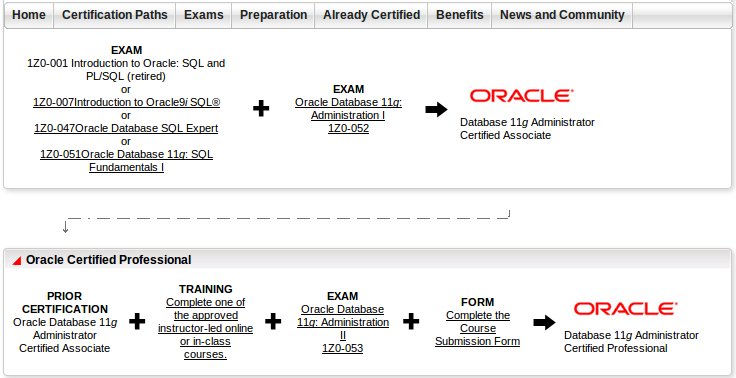
Certification Path:-
OCA

SQL - 125$ - (1Z0-051)
Admin1 - 195$ - (1Z0-052)
============================

OCP
Admin2 - 195$ - (1Z0-053)
============================

We have to create an enviornment first to start Preparation.....

Operating System - Red Hat Enterprise Linux 5
Oracle - Oracle 11g Ver 11.2.0.1.0
-----------------------------------------------------------------------------
Create a User for all R&D

SQL>

create user shinoj identified by shinoj
Default tablespace users
Quota unlimited on users;

grant connect, resource,DBA to shinoj;

grant create role to shinoj;

SQL>

Start Enterprise Manager

$emctl start dbconsole

Now you can access enterprise Manager by

https://serverIP:1158/em


How To Install LAMP on Ubuntu 12.04

L inux         A pache         M ySQL             P HP Step One—Install Apache open terminal and type in these commands: s udo apt-ge...